Learn which Later limits push creators to upgrade, and which of seven alternative plans fits your channels, budget, and workflow.
Later is a good tool if your content lives on Instagram. The grid preview is polished, the Instagram-specific features are deep (product tagging, collab post scheduling), and there's a creator marketplace attached. The trouble starts when your output grows or your channel mix changes, because the plan limits begin to matter more than the features.
Where Later's plans start to pinch
Before you pay for another tool, check whether you're actually hitting these walls. If none of them sound familiar, staying put is a perfectly good call.
- <strong>Post caps:</strong> monthly limits per social channel hurt high-output creators and anyone running several active channels.
- <strong>AI credits:</strong> every plan has a monthly cap, and once you hit it you buy top-ups.
- <strong>Analytics history:</strong> lower tiers only look back a short way, and LinkedIn company pages get no analytics at all.
- <strong>Extra social sets:</strong> adding more costs a notable premium each month.
- <strong>No CSV bulk upload:</strong> scheduling a big campaign means doing it by hand.
- <strong>No X/Twitter support:</strong> you'd need a separate way to schedule tweets.
- <strong>Thin free plan:</strong> 12 posts per channel, a link-in-bio page, the media library and the creator marketplace, but no unified inbox or analytics. It exists, but it isn't listed on the pricing page.
The bulk upload and X/Twitter gaps are the two I'd weigh most. They aren't a matter of budget. Either you can run your workflow in the tool or you can't.
Seven alternatives, sorted by what the plan gets you
Prices below are entry-level plans billed monthly, as listed in the source comparison. Check each vendor's page before committing, since pricing shifts.
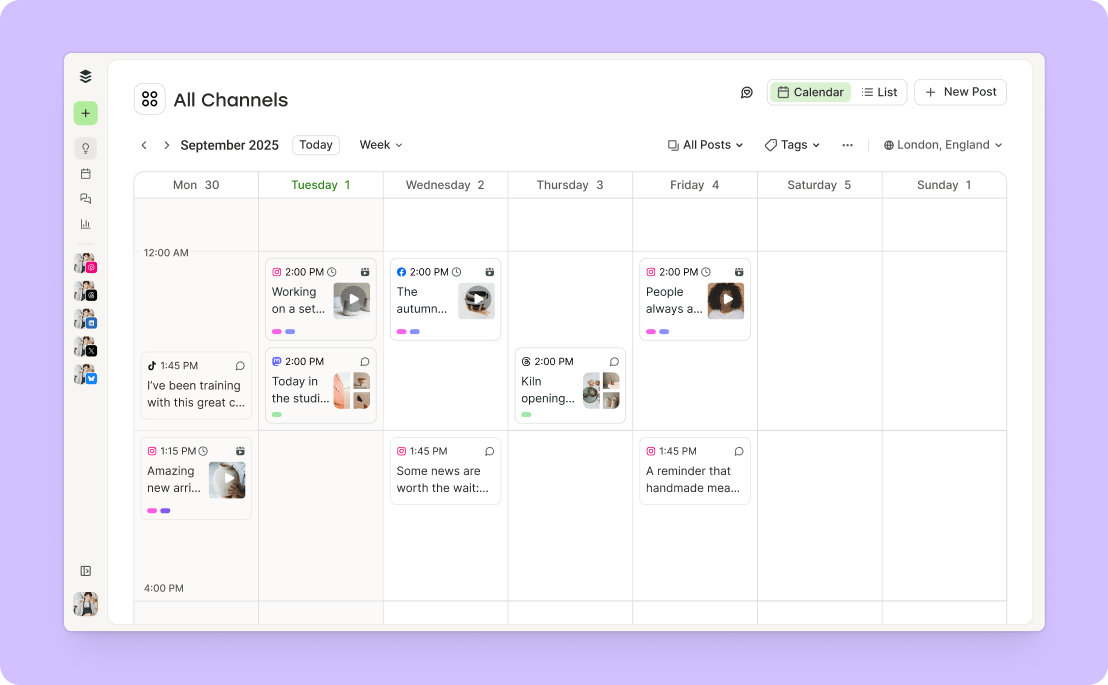
Buffer is the broadest swap. The free plan covers 3 channels with up to 10 scheduled posts per channel at a time, and slots reopen as posts go out. There's no monthly posting cap. Paid plans start at $6/channel/month, with 20% off for annual billing and a 14-day trial. It supports 12 platforms, including X, Bluesky, Mastodon, and Substack. On Instagram it handles Reels music, up to three collaborators, Trial Reels, multi-story sequences, Grid Preview, and Shop Grid for a shoppable bio link.
Meta Business Suite is the zero-cost route. It schedules Instagram, Facebook, and Threads, and has no paid tier. It makes the most sense if you already run paid ads inside Meta's tools and don't need other networks.
The remaining five are more specialized, and each costs noticeably more or serves a narrower use case:
- <strong>Sprout Social ($99/month, 30-day trial):</strong> the closest match to Later's influencer features, so it suits brands running creator campaigns.
- <strong>Hootsuite ($149/user/month, 14-day trial):</strong> built for large teams that want social listening, industry benchmarking, and 100+ integrations.
- <strong>Agorapulse ($99/user/month, 30-day trial):</strong> pulls ad comments into the same inbox as organic engagement, which helps teams running both.
- <strong>Planoly ($16/month, free plan with 1 social set and 10 media uploads a month):</strong> its Creator Store lets you sell products, downloads, and services from a link in bio.
- <strong>RecurPost ($9/month, 14-day trial):</strong> a strong Instagram feature set plus deeper publishing controls for TikTok and YouTube, good for video-first creators.
How to pick without overpaying
Match the plan to your bottleneck, not to the longest feature list. A solo creator posting across four networks has nothing in common with an enterprise team doing social listening, and the $99 to $149 tools are priced for the second group. If your pain is post volume or bulk scheduling, a per-channel model like Buffer's tends to scale more predictably because you pay for the channels you actually use.
Also compare free plans honestly. Buffer's free tier caps queued posts at 10 per channel but not monthly output, while Later's free tier caps total posts at 12 per channel. Those sound similar and behave very differently if you publish daily.
Run a trial for a full posting cycle, not an afternoon. Limits only show up once you load a real calendar into the tool.
- List every channel you post to, including X, and mark which ones Later doesn't support.
- Count your posts per channel last month and compare to each plan's caps.
- Note whether you schedule campaigns in batches that need CSV bulk upload.
- Check how far back analytics go on the tier you'd actually buy.
- Decide if you need influencer tools, a shared inbox, or a storefront, and cross out tools that don't offer them.
- Start a free plan or trial and load two weeks of real scheduled content.
- Price the paid tier at your channel count, using annual billing if you're staying.

Leave a
comment