Learn where to spot rising TikTok audio, why it helps your reach, and how to turn a sound into a video idea you can shoot today.
Trending audio is the cheapest idea generator you have. A sound that's climbing already comes with a format, a punchline, and an audience that knows what's supposed to happen. Your job is to add your niche on top.
Why a trending sound is worth your time
TikTok leans on familiarity. If someone lingers on a video with a particular sound, the app will often serve them another video using that same audio a few swipes later. It's trying to work out whether the music was the reason they stayed. If it was, they get more of it. Your video can be one of those "more of it" slots, especially if you're early.
The second benefit is memory. A catchy sound sticks, and the video attached to it sticks with it. The sounds that really break through become shorthand for a joke or a mood, so viewers get your point in the first second without you explaining anything.
Where to find sounds before they peak
You don't need to doomscroll for hours. A few built-in tools and one or two outside ones will cover it. Start with TikTok's Creative Center, which tracks top songs by region and time period. One caveat: its trending audio lists were being reworked and showed nothing available when this was written, so treat it as a maybe, not your only source.
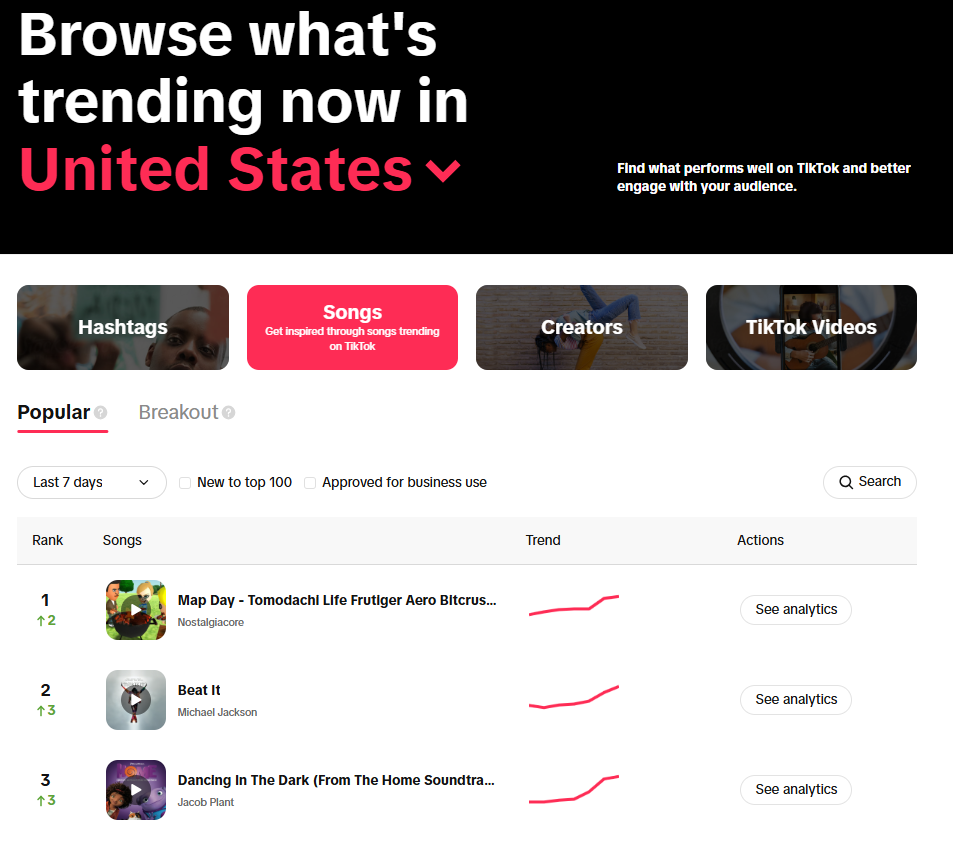
Here are the other places worth checking:
- <strong>TikTok search:</strong> type "viral sound," open the Sounds tab, and look at the tracks labeled popular.
- <strong>Upload suggestions:</strong> when you post a video, TikTok recommends music that fits your content. It's a quick way to find relevant audio.
- <strong>Add Music > Discover more sounds:</strong> browse playlists by genre, category, or what's hot in your region.
- <strong>Tokchart:</strong> shows the fastest-rising sounds from the last 24 hours in real time. You'll need a paid account for the full details.
- <strong>Instagram Reels:</strong> tap the music icon in the editor and check the Trending tab. Plenty of songs cross over from TikTok.
Whatever you find, tap the sound name and watch a handful of videos that use it. You need to know the format before you copy it. Otherwise you risk missing the joke, or posting something that doesn't fit the sound at all.
Turn a sound into a content idea
Most trending sounds fall into a few repeatable formats. Once you can spot them, you can adapt almost any sound to your niche. Here are some patterns from recent trends:
- <strong>The reveal:</strong> a Halloween costume walk to "Ramalama (Bang Bang)" by Róisín Murphy, with the camera panning up from your feet. A "Upside Down" by Diana Ross transition works similarly: sync gestures to the lyrics, then show the finished look. Both suit makers, stylists, and any before/after niche.
- <strong>The ranking:</strong> pick a topic from your niche and rank the options using only facial expressions and hand gestures. Opinions are easy to make on camera and invite comments.
- <strong>The setup and punchline:</strong> one sound carries the setup, then the audio switches to a second song for the payoff. One version swaps to "Poker Face" by Lady Gaga when someone says "it's OK, I'm used to it." Timing is everything.
- <strong>The text narration:</strong> one trend borrows the ominous "A" messages from Pretty Little Liars. Creators write everyday moments as creepy texts signed "-A." It works for any niche with a recurring frustration.
- <strong>The two-person challenge:</strong> "Find the Beat" uses a slowed Jersey Club track. One person knows the moves and the other has to find the beat on the spot. It's easy to film with a friend, coworker, or gym buddy.
- <strong>The simple caption video:</strong> a sound built around a single line, like Drake's "October is all about me," paired with on-screen text. It's the lowest-effort format on this list.
Notice what these have in common. Each one is a format you could shoot in one take with a phone. If you're ever stuck, pick the sound that needs the least setup and ask what your niche's version of the joke would be.
A quick workflow you can repeat
Trends move fast, so keep the process short. Aim to go from spotting a sound to posting within a day or two.
- Check two or three sources (search, Discover playlists, Tokchart, Reels) a couple of times a week.
- Save any sound that fits your niche so you can find it later.
- Tap the sound and watch at least five example videos to learn the format.
- Write one line describing your niche's version of the trend.
- Shoot it in one or two takes. Don't over-edit.
- Post while the sound is still rising, not after it has peaked.
- Note how it performed, so you know which formats suit your audience.
Not every sound will fit what you make, and that's fine. Skip the ones that force a strange pivot. The goal is a video that feels native to your account and happens to use a sound people already recognize.
Leave a
comment